Adding Appearance Presets to Talior.me
I just pushed an update to talior.me that solves a problem I kept running into while applying for jobs myself.
When I was applying, I did not use a single resume format across everything. I needed different resume styles depending on the role. For new grad positions, I usually wanted a format that gave more room to projects, education, and technical breadth. For experienced roles, I wanted a version that felt more work-history-first and slightly more traditional.
The content-tailoring aspect of the product was already in place. The annoying part was the presentation. I did not want to keep manually reordering sections, changing font choices, or tweaking the same visual settings every time I generated a different version.
So this update was about turning appearance into something reusable.
The problem I wanted to solve
A tailored resume is not just about changing bullet points.
A lot of the time, the format itself changes too:
- one version should feel more new-grad friendly
- another should feel more experienced and work-history heavy
- sometimes I want a cleaner, modern font
- sometimes I want a denser layout with smaller type
- sometimes I want projects higher up, sometimes experience
Before this change, those decisions were too manual. Even if the resume content was generated correctly, I still had to keep redoing the visual setup.
That felt like the wrong kind of friction.
I wanted a way to save appearance decisions once and reuse them across resumes, instead of treating styling as something temporary.
What’s new in this update
A dedicated appearance system
PR #12 adds a real appearance preset system to talior.me, not just a couple of frontend toggles.
Users can now create, update, delete, and manage named resume presets with things like:
- font family
- font size
- section order
- default preset selection
The main idea was to make resume appearance a first-class object in the app instead of a loose UI state.
A new Appearance page
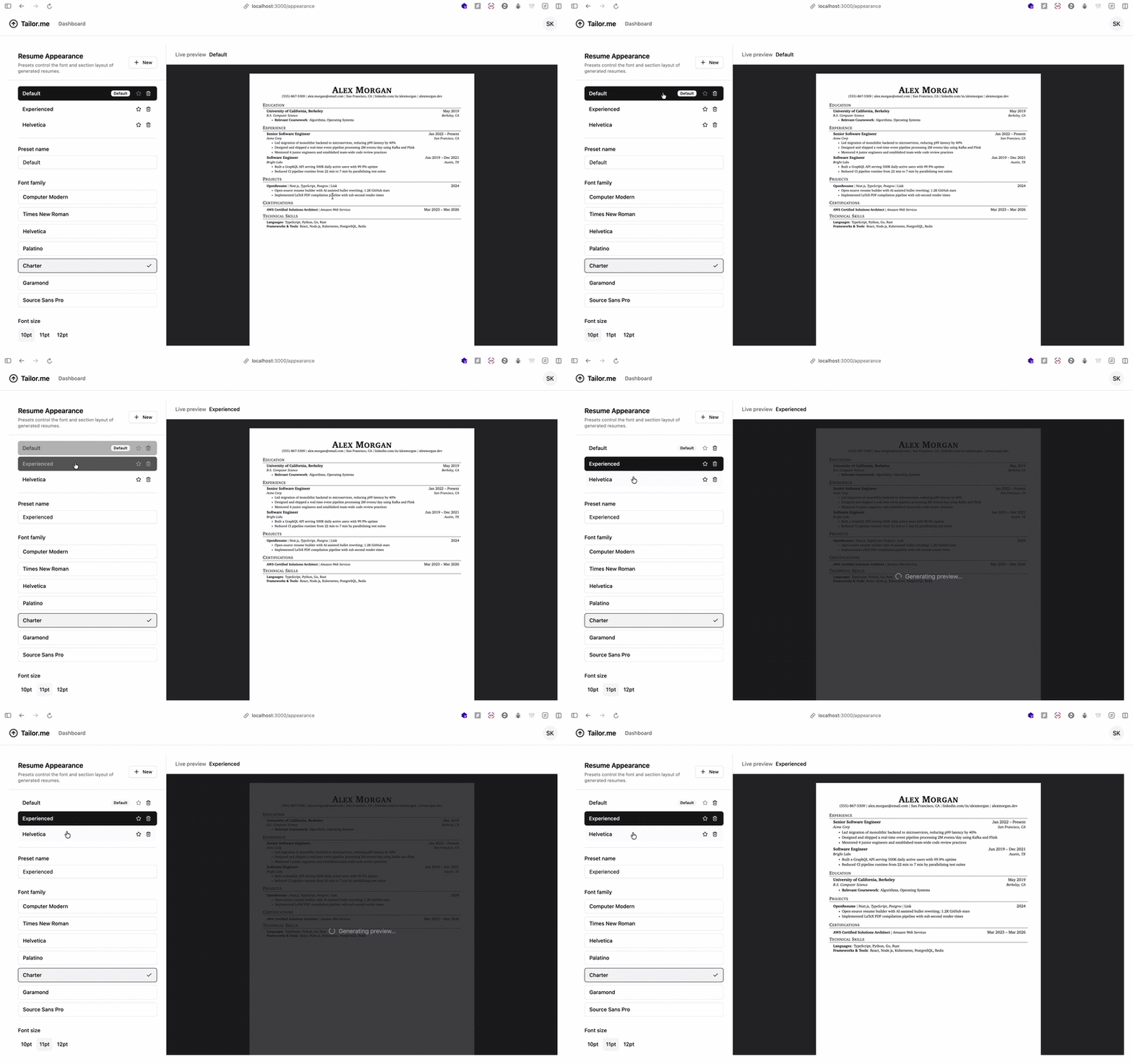
I added a dedicated Appearance page for managing presets.
This is where a user can build different formats for different job-search contexts. For example, one preset can be optimized for new grad applications, and another can be optimized for more experienced roles.
Instead of redoing those preferences inside the resume builder every time, the settings now live in one place.
Preset selection inside the Resume Builder
I also added a preset selector directly in the Resume Builder.
That part mattered because I did not want presets to feel disconnected from the core workflow. The whole point is that when I am actually creating a tailored resume, I can quickly switch to the format I want and keep moving.

Live preview support
Another thing I wanted was feedback.
If appearance settings are going to be useful, you need to see what they actually do. So this update also includes a preview component that renders resumes based on the selected preset.
That makes the workflow much better because I can adjust style choices and immediately see whether the resume feels right for the kind of role I am targeting.
Backend support for defaults
This was not just a UI feature.
I updated the API to support preset queries and mutations, added the DTOs and shared types needed for managing them, and updated the resume processor so it can automatically apply a user’s default preset.
That last part was especially important to me. I wanted appearance settings to be part of the actual generation pipeline, not just something that sits in the frontend and gets forgotten.
If I have a default format I like, the system should respect it automatically.
Why this matters (for me)
This update came directly from my own workflow.
When I am applying seriously, I am usually not producing one resume. I am producing variations of the same base resume for different contexts, and the format matters more than people think.
A new grad application and an experienced application can ask for different emphasis even when the underlying content overlaps.
I did not want talior.me to only help with the wording while leaving the presentation workflow clunky. I wanted it to help with both:
- tailoring the resume content
- keeping the resume format reusable and consistent
That is what this update does for me.
It turns appearance from something I repeatedly fix by hand into something I define once and reuse.
What I like technically about this change
I like this PR because it is the kind of feature that looks small from the outside but is actually full-stack.
It touches:
- data modeling
- API design
- shared DTOs and enums
- frontend state and interactions
- rendering and preview flows
- resume generation defaults
Those are my favorite kinds of changes to build because they force the product and implementation details to line up.
It is not just “add a settings page.” It is “make appearance a real part of the system.”
What I want to build next
Now that presets exist, there are a few obvious directions to take this further:
- role-aware preset suggestions
- better one-click switching between formats
- more layout controls beyond font and order
- tighter coupling between preset selection and tailored job flows
The bigger goal is to make tailor.me feel less like a one-off resume generator and more like a system for running the whole application workflow with less repeated effort.
And for me, reusable appearance presets were one of those missing pieces.